
The Ultimate Guide to Google App Campaigns in 2026
In 2026, Google App Campaigns remain one of the most powerful, yet most misunderstood, channels for mobile user acquisition.
After nearly a decade on the market, GAC has evolved into a fully AI-driven system that controls targeting, bidding, placements, and creative combinations across Google Search, Play Store, YouTube, Display Network, and Discover. While this automation simplifies execution, it also removes much of the transparency marketers are used to, creating frustration around reporting, control, and predictability.
The reality is that success with Google App Campaigns no longer comes from manual optimization, but from understanding how to feed the algorithm with the right signals, budgets, and creative inputs.
This guide explains how experienced teams do exactly that, and how you can consistently scale GAC even when you can’t see inside the black box.
Why Google App Campaigns Still Feel Like a Black Box
Google App Campaigns are designed to automate nearly every operation. Advertisers do not select keywords, audiences, or placements manually. Instead, Google’s machine learning models analyze thousands of real-time signals to decide when, where, and to whom ads should be shown.
Reporting limitations reinforce this black-box perception. Creative performance is accumulated, placement-level transparency is restricted, and advertisers cannot see or control audience segmentation. While Google does provide limited visibility into third-party app placements based on impressions, this data is not granular enough to support hands-on optimization. These constraints are intentional. Google’s philosophy is that outcome-based optimization performs better when humans do not interfere with the learning process.
As a result, Google App Campaigns are built to optimize results, not explain decisions. Marketers who succeed with GAC focus less on control and more on inputs: conversion signals, budget sufficiency, campaign structure, and creative quality.
Choosing the Right Campaign Objective
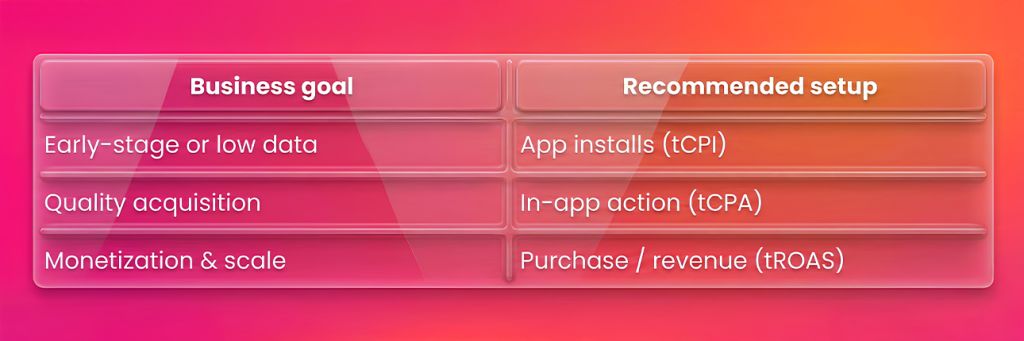
Google offers three App Campaign types: App Installs, App Engagement, and App Pre-registration (Android only). While install campaigns are often the default starting point, they rarely produce strong long-term performance unless followed quickly by deeper optimization.
Campaign selection should be driven by the depth and volume of available conversion events. Optimizing for in-app actions such as sign-ups, trial starts, or purchases allows the algorithm to target higher-intent users, but only when those events occur frequently enough to support learning.
As a practical benchmark, Google generally requires 30–50 conversions per day per campaign to stabilize tCPA bidding. For tROAS optimization, revenue events must be both consistent and passed with accurate value and currency parameters.
Budgeting for Learning and Not Guessing
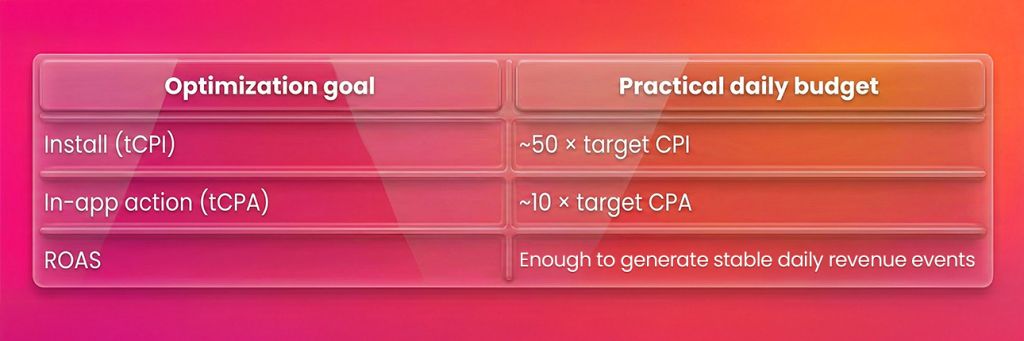
Budget size directly determines whether a campaign can exit the learning phase or not. Campaigns with insufficient budgets struggle to test enough users, creatives, and placements, leading to unstable CPAs and inconsistent delivery. At the same time, increasing budgets too aggressively before stabilization often introduces noise and resets learning.
Experienced UA teams typically follow these baselines:
Conversion Events: Depth, Volume, and Signal Quality
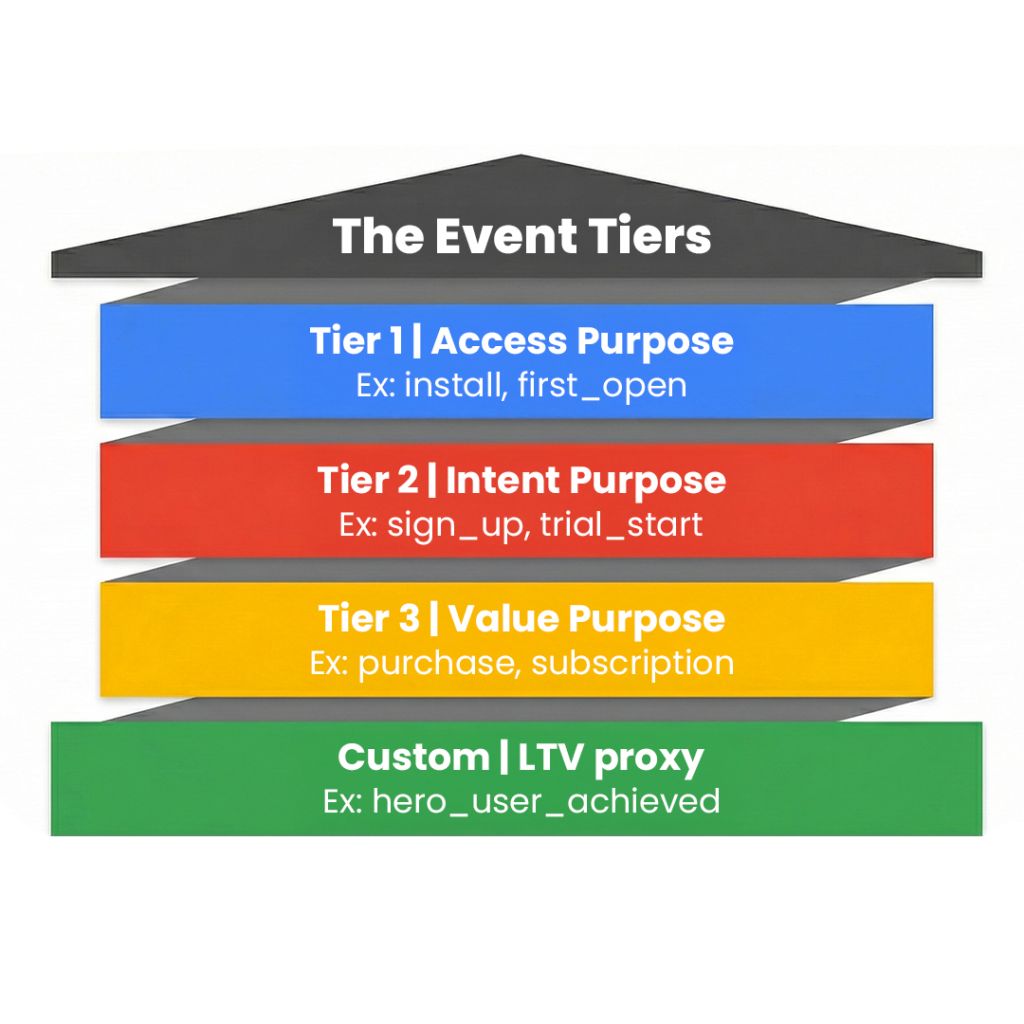
Google App Campaigns learn exclusively from the conversion events you provide. Shallow events such as installs or first_open offer limited insight into user intent and often influence the algorithm toward low-cost, low-value traffic.
Deeper events, such as sign_up, onboarding_complete, start_trial, purchase, subscribe, or renewal—enable the system to identify users with higher long-term value. However, depth alone is not enough. These events must occur frequently, ideally 30–50+ times per day, to support stable optimization.
Many advanced teams also define custom events, such as users who complete multiple sessions and spend a minimum amount within a defined time window. These events act as early LTV substitutes and often outperform raw purchase signals during scale.
Tracking & Attribution: Where Most Campaigns Break
Underperformance in Google App Campaigns is often caused by tracking issues rather than bidding or creatives. Common problems include delayed postbacks, incorrect attribution windows, events firing only on attributed installs, or misconfigured event mapping between Firebase or an MMP and Google Ads.
Delayed conversion data causes the algorithm to optimize on outdated signals, resulting in unstable CPAs and inefficient spend. This is why many teams prefer Firebase for GAC. Firebase sends events in real time, supports value-based parameters for tROAS, and integrates natively with Google Ads, GA4, and the Play Store.
MMPs such as Appsflyer, Adjust, or Singular can work, but require careful configuration, including proper attribution windows (often 7-day click), full postback coverage, and consistent event naming.
Campaign Structure That Enables Learning
- Campaign structure should reduce internal competition and keep learning signals clean.
- Android and iOS campaigns should always be separated due to different attribution systems (including SKAdNetwork on iOS) and user behavior.
- Campaigns should also be split by optimization goals to avoid confusing the algorithm.
Running multiple campaigns in the same market optimizing for the same event often leads to cannibalization, slower learning, and volatile CPAs. Clear separation by device, goal, and markets is essential for stability.
Asset Groups and Creative Strategy
- Asset groups should be treated as controlled creative tests rather than containers for all available assets.
- Each asset group should communicate one clear idea, such as a feature benefit, emotional hook, lifestyle context, or promotional offer.
- Mixing multiple themes in a single group makes it difficult to understand what is driving performance.
- Creative fatigue remains a major performance risk even in automated campaigns.
- High-spend asset groups should be refreshed regularly, and underperforming assets should be replaced quickly to maintain engagement and signal freshness.
Text Assets: Headlines & Descriptions
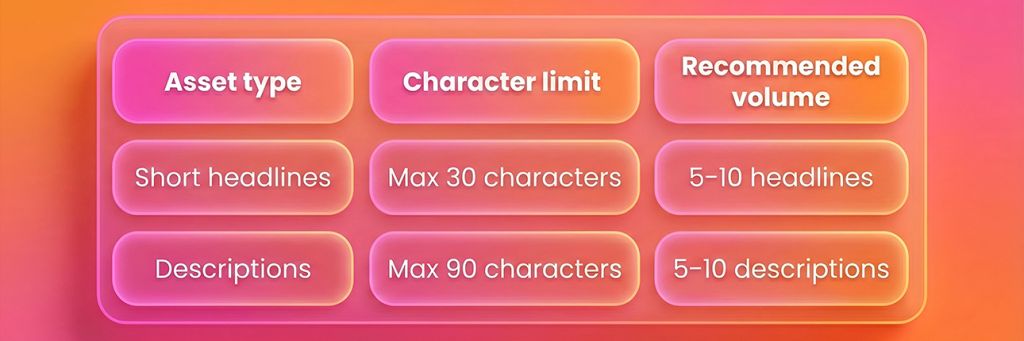
Text assets are used across Google Search, Play Store, Display, YouTube, and Discover placements. Google automatically combines headlines and descriptions with your visual assets to generate ads across surfaces.
Because you do not control where each variation appears, providing sufficient volume and variety is essential for performance and learning.
Technical Notes
- Headlines and descriptions are dynamically mixed across placements
- Google prioritizes assets that align with user intent signals
- Under-supplied text assets can restrict delivery and slow learning
Best Practices for Text Assets
- Write multiple angles (feature-led, emotional, social proof, urgency)
- Avoid repeating the same message with minor wording changes
- Do not include “Click here” or overly promotional CTAs
- Ensure text aligns with app store messaging and creatives
- Keep language clear and benefit-driven rather than descriptive
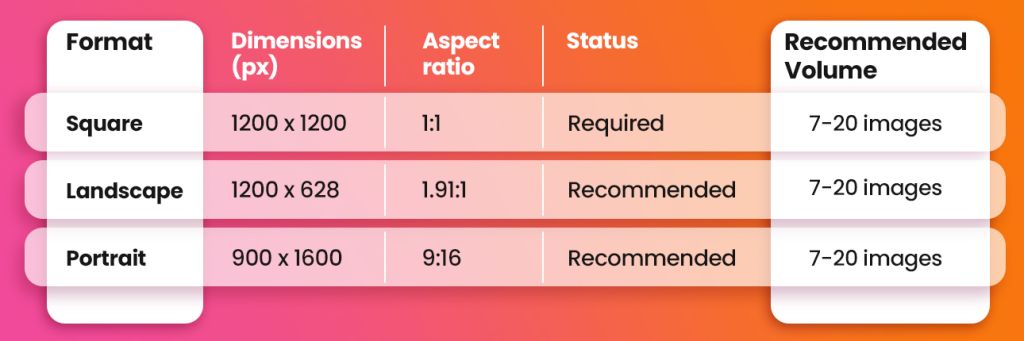
Image Assets: Required Specs
Images are used across Play Store, Display, Discover, and some YouTube placements.
Square images are mandatory, but campaigns perform significantly better when all supported formats are included.
Technical constraints
- Max file size: 150 KB
- File types: PNG or JPG
Best practices
- Avoid text-heavy visuals
- Design for mobile-first consumption
- Use high contrast and simple layouts
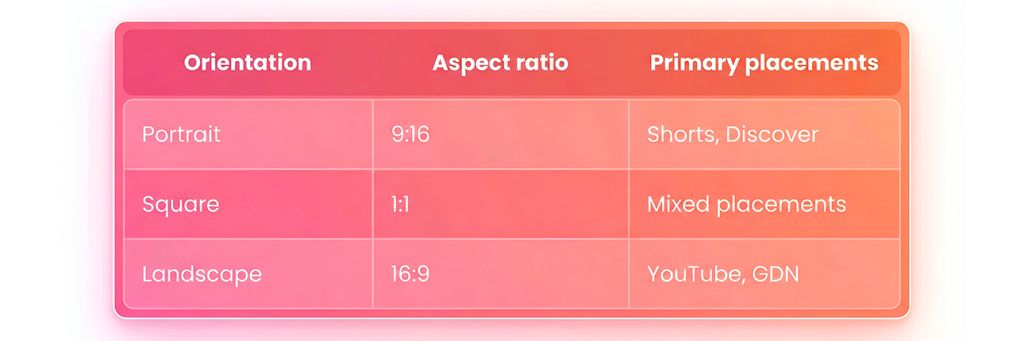
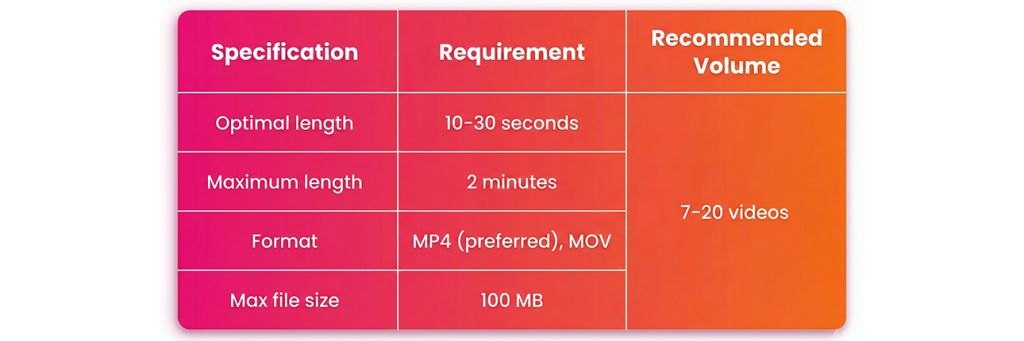
Video Assets: Critical for Scale
Video is one of the strongest performance drivers in Google App Campaigns, particularly across YouTube Shorts, Discover, and in-feed placements. Campaigns without video often struggle to scale efficiently.
Best practices
- Show app UI within the first 3–5 seconds
- Include branding early
- Avoid “Click here” text overlays
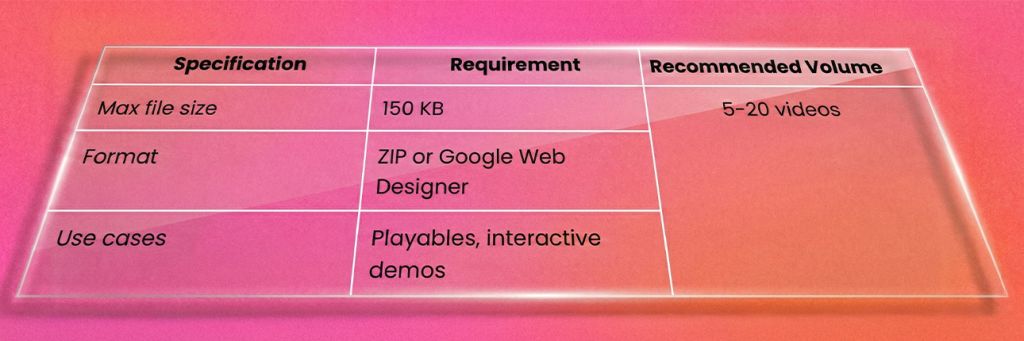
HTML5 Assets (Optional but Powerful)
HTML5 assets enable interactive or playable ad experiences and are particularly effective for gaming and utility apps. While not mandatory, they can unlock crucial performance when built correctly.
Scaling Without Breaking Performance
Scaling should only begin once performance has stabilized. In practice, this means 5–7 consecutive days of consistent CPAs or ROAS, steady conversion volume, and predictable spend distribution.
Budgets should be increased gradually, typically 15–20% every 48–72 hours. Larger or more frequent increases often reset learning and introduce volatility, particularly in tCPA and tROAS campaigns.
Final Takeaway
Google App Campaigns reward teams that understand systems, thresholds, and constraints, not those who chase installs or rely on guesswork.
When conversion events are meaningful, budgets support learning, tracking is real time, and creatives are refreshed consistently, the algorithm becomes a highly efficient growth engine, even without full transparency.
Let’s grow the right way.